
Grass.io Honest Review + Real Payment Proof: Is It Really Possible to Earn Big Passively?
- pravin
- 0 Comments
Grass.io Honest Review + Real Payment Proof: Is It Really Possible to Earn Big Passively?
Grass.io (previously known as GetGrass.io) lets you earn passive income by sharing your unused internet connection. It sounds like an easy way to earn money, and the platform is legitimate—it has paid users and distributed real rewards.
However, being legitimate doesn’t automatically mean it’s worth joining.
During Season 1 (also called Stage 1), Grass built a strong reputation by rewarding early users with what many considered a generous and fair $GRASS token airdrop.
Unfortunately, Season 2 (also called Stage 2) completely changed that. After nearly 19 months of user contributions, the Season 2 reward allocation was so low for most users that it didn’t even cover the cost of one or two months of internet and electricity. This made the rewards far from fair considering the time, internet bandwidth, and other resources users contributed.
Grass also started Season 2 by stating that users would be rewarded with $GRASS tokens after the season ended. However, when it came time to distribute the rewards, Grass changed the reward structure and the reward option, and failed to deliver on that promise. Because of this, the platform failed to live up to the expectations it created and lost much of the trust it had built during Season 1.
That doesn’t necessarily mean Grass is a bad platform. It can still be a decent passive earning option for some people, especially in certain regions. But it’s no longer a platform I would recommend to everyone without explaining its drawbacks.
If you’re still thinking about joining, there are a few important things you should know first—such as whether it’s safe, how much you can realistically earn, how rewards are distributed, and what payout options are available.
In this review, I’ll cover everything in simple English. I’ll also explain what changed from Season 1 to Season 2, why most users were disappointed, who Grass may still be worth using for, and who should avoid it. Read the full review before deciding whether Grass is the right platform for you.
Table Of Content
- 01. What is Grass.io?
- 02. How Does Grass Use Your Internet?
- 03. A Quick Look at Grass.io’s Journey
- 04. Where Grass.io Stands Now
- 05. Who Can Join Grass?
- 06. Is Grass Safe to Use?
- 07. Which Devices Support Grass?
- 08. Can You Run Both the Extension and App at the Same Time on One Device?
- 09. Can You Use Grass on iOS Mobiles?
- 10. What Earning Opportunities Does Grass Offer?
- 11. How and When Are Rewards Distributed?
- 12. How Are Grass Points Converted into Rewards?
- 13. What About Future Rewards?
- 14. How Much Can You Actually Earn on Grass?
- 15. How Do You Get Paid?
- 16. Does Grass.io Really Pay?
- 17. What You Should Avoid Doing on Grass
- 18. Can You Get Support?
- 19. How to Get Started?
- 20. How to Fix the 0% Network Quality Issue
What is Grass.io?

Grass.io is a unique platform that lets you earn rewards passively by sharing your internet connection. It has built a massive network with the help of millions of people who want to earn from something they’re already paying for—unused internet bandwidth.
The idea behind Grass is simple but powerful: to create a fairer internet where everyday users benefit when big companies use their extra bandwidth. Most people accept terms and conditions without realizing companies quietly profit from their unused network resources. Grass changes that by giving control—and rewards—back to the users.
How Does Grass Use Your Internet?
When you share your internet with Grass, it’s used by top AI labs to collect large, real-time datasets to train advanced AI models. This includes powering tools that help large language models (LLMs) stay updated with fresh, real-world information.
A Quick Look at Grass.io’s Journey
- Launched as GetGrass.io (Alpha Stage): Grass began its journey in July 2023 under the name GetGrass.io. During this early phase, users didn’t receive rewards but were promised something big in the future.
- Official Launch (October 2024): Grass went live and surprised the crypto world with a massive airdrop worth over $300 million in Grass tokens. It became one of the biggest airdrops of the year and marked the first time a non-DeFi project had made such a large-scale token distribution.
- Massive Growth: The huge airdrop brought worldwide attention, especially from people who love earning free crypto for doing almost nothing.
- Domain Upgrade (April 25, 2025): The team officially acquired the Grass.io domain, dropping the “Get” and solidifying the brand.
Where Grass.io Stands Now
Today, Grass.io has over 8 million users worldwide, all earning rewards passively by sharing their internet connection. It’s not just an income source—it’s part of a growing movement toward a more user-powered internet.
Who Can Join Grass?
Anyone around the world can join Grass! If you have a computer (desktop or laptop) or a mobile phone with an internet connection—whether it’s mobile data or broadband—you’re good to go.
Is Grass Safe to Use?
Grass is designed with safety in mind. It doesn’t have access to your device storage or personal data. The platform only uses your internet bandwidth and public IP to function—nothing more.
To keep your connection secure, Grass uses advanced encryption techniques. Plus, it’s recognized as safe by all major antivirus providers, which adds extra peace of mind.
But here’s the truth: any platform that uses your internet connection for rewards—even Grass—carries a small risk. It doesn’t mean you’re definitely in danger, but rare security or privacy concerns can happen. So, it’s always smart to stay informed and use such platforms responsibly.
Which Devices Support Grass?
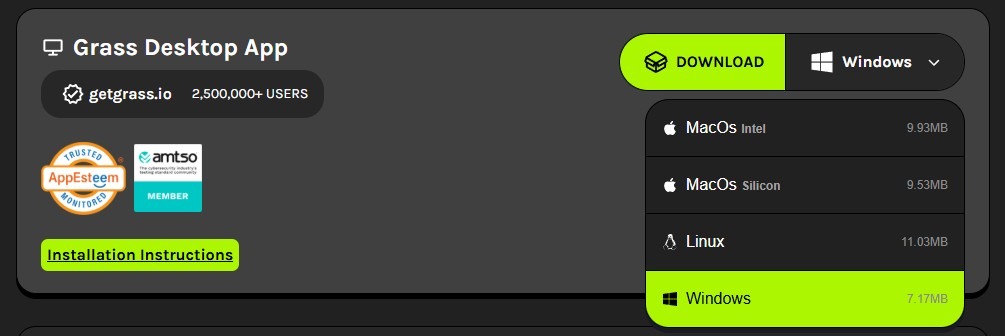
Grass is currently available on Windows, Mac, and Linux computers — both desktop and laptop. These are called desktop nodes.
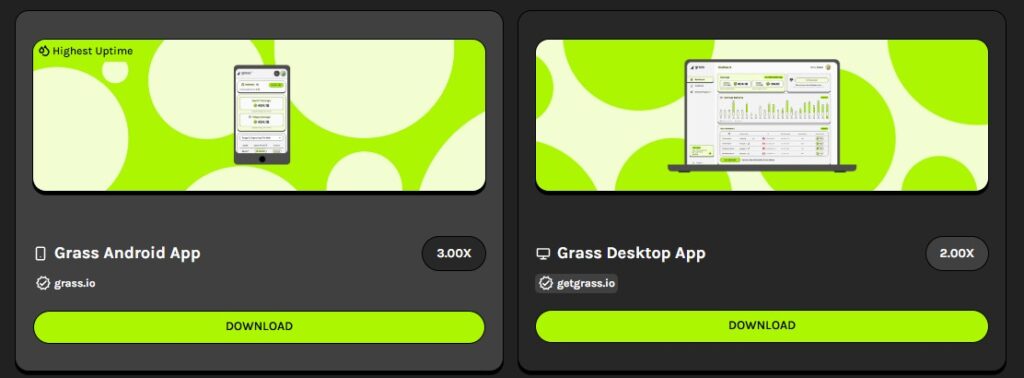
Grass also has a mobile app for Android and Solana mobile devices. The Android app offers the highest rewards. It’s working on launching its app for iOS soon.
In addition to the desktop and mobile app, Grass offers two Chrome browser extensions:

- Lite Node Extension – Easy to install from the Chrome Web Store.
- Community Extension – More advanced, but you’ll need to manually download and install it from the Grass Store.
When it comes to rewards:
- Mobile app earns 3x more than the Lite Node Extension.
- Desktop node earns 2x more than the Lite Node Extension.
- Community Extension gives 1.25x more than the Lite Node Extension.
⚠️ Important update: Grass will soon stop supporting both the Lite Node and Community extensions. That means the mobile app and desktop node are your best options for stability and maximum rewards.
Can You Run Both the Extension and App at the Same Time on One Device?
No, you can’t. If you run both together on your device, only one — either the app or the browser extension — will connect to the Grass network. The one that connects first will start earning, and the other won’t work.
In fact, trying to run both at once may sometimes cause connection issues for both. So, it’s best to stick with just one to ensure smooth performance and steady rewards.
Can You Use Grass on iOS Mobiles?
Grass is planning to launch its app for iOS soon. Once it’s officially available, I’ll update the details here.
For now, if you really want to try it on iOS mobile, you run the Chrome extension (Lite Node) using browsers like Mises or Kiwi. But keep in mind — Grass is planning to stop support for extensions soon, so it might stop working at any time.
What Earning Opportunities Does Grass Offer?
Grass isn’t just about sharing your internet—it also offers other ways to earn passive income.
Here’s a quick breakdown of all the earning opportunities available on the platform.
Option 1 – Bandwidth Sharing
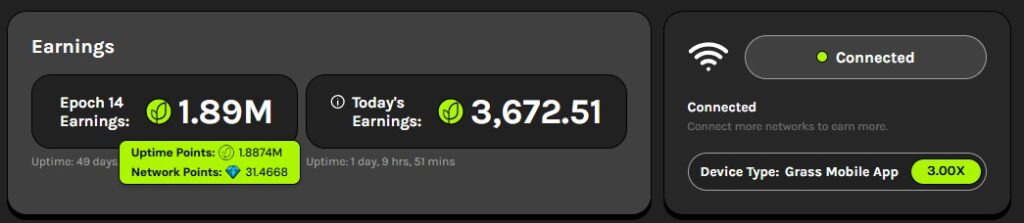
The primary way to earn on Grass is by sharing your internet connection. What makes Grass different from other platforms is that it rewards you not just for the bandwidth used, but also for device uptime.
You earn two types of points: Network Points and Uptime Points. Together, these are called and shown as Grass Points, but you can see both types separately as well as the total.
Network Points are rewarded based on the amount of bandwidth your connection actually contributes. Each day, a fixed pool of 1,000,000 Network Points is distributed among users based on their share of the total bandwidth contributed by all users worldwide. These points are not guaranteed—you only earn them when your bandwidth is actually used.
On the other hand, Uptime Points are guaranteed. You earn them based on how long your device stays connected, the type of extension or app you use, and the quality of your network.
Grass determines your network quality based on the demand for bandwidth in your country. This can go up to 100% in countries with high demand.
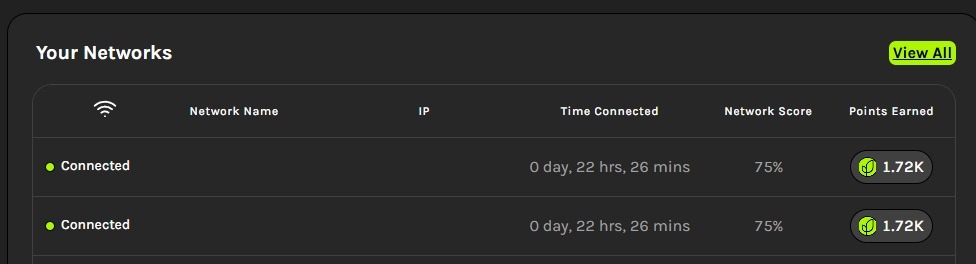
For example, if your network quality is 75% and your device stays connected for one hour, you’ll earn Uptime Points as follows:
- Lite Node extension: 75 Uptime Points
- Community extension: 93.75 Uptime Points
- Desktop Node: 150 Uptime Points
- Mobile app: 225 Uptime Points
One cool thing about Grass is that you can run its app or extension on multiple devices using the same network (IP address). However, if multiple devices share the same IP, you’ll earn reduced Uptime Points across those devices. To earn full Uptime Points on each device, you’ll need to use different networks (IP addresses).
Option 2 – Uptime Bonus
Grass rewards your consistency. Once your total device uptime reaches 100 hours, you’ll earn a 5,000 Uptime Points bonus—just for staying connected.
Option 3 – Invite Friends
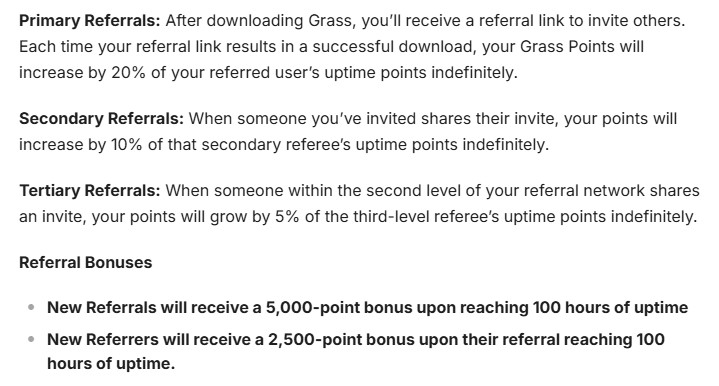
Grass has one of the most rewarding referral programs in the online earning space—and it runs across three levels.
Once you join Grass, you’ll get a unique referral link. Share it with others, and when someone signs up using your link and starts earning Uptime Points and Network Points, you earn too.
Here’s how much you earn from referrals:
- Level 1: Earn a 20% bonus in Uptime Points and Network Points from the Uptime Points and Network Points earned by your direct referrals—forever. They still receive 100% of their own points; your bonus comes from Grass.
- Level 2: Earn an extra 10% bonus in Uptime Points and Network Points from the points earned by your second-level referrals.
- Level 3: Earn a 5% bonus in Uptime Points and Network Points from the points earned by your third-level referrals.
And there’s more! When your direct referral reaches 100 hours of uptime, you’ll receive a 2,500 Uptime Points bonus on top of your regular referral rewards.
There’s no limit to how many people you can invite. The more active users you bring in, the more Uptime Points and Network Points you can earn passively. If you’re good at building a referral network, this program gives you a great opportunity to turn your connections into long-term rewards on Grass.
Option 4 – Level-Up Bonus (Tier Rewards)
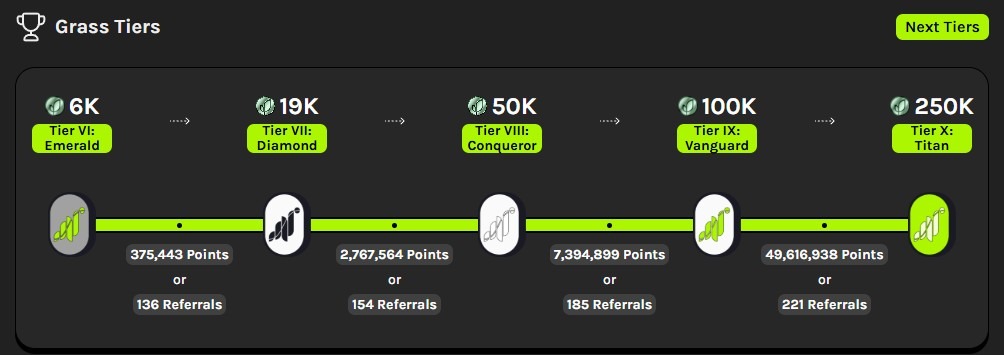
Grass gives you a huge amount of Uptime Points as a bonus for actively sharing your connection and growing your referral network through its exciting 10-tier level system.
When you first join, you start at Tier 0 (which means you haven’t reached any level yet). You can move up through the tiers automatically by meeting either of these conditions:
- Earning a certain number of Uptime Points by keeping your connection active or through your referrals—or a combination of both.
- Inviting a certain number of active direct referrals (they must stay connected for at least 100 hours to be considered active).
Each time you level up, you unlock bigger bonus rewards. When you reach Tier 10 (X), Grass gives you a massive 250,000 Uptime Points bonus.
These bonuses aren’t added automatically. You’ll need to visit the Rewards page and click the Claim button to collect them.

So, the more active you are and the more your network grows, the faster you level up—and the more rewards you unlock.
Option 5 – Social Media Giveaways
Grass runs fun social media giveaways from time to time on its official pages like X (formerly Twitter) or Discord. These giveaways often involve simple tasks—and they give you a chance to win cool rewards!
You might be asked to like or share their posts, tag friends, give feedback to improve Grass, or post a short video about Grass.
Winners can get free $GRASS tokens, a Grass-branded jersey or hat, and other exciting prizes. To win, just stay active in these giveaways—and of course, a little luck always helps!
How and When Are Rewards Distributed?
So far, Grass hasn’t distributed rewards daily, weekly, or monthly. Instead, it has followed a Stage-based system (also called a Season).
Rewards are allocated only after a Stage ends and become available to claim once the allocation is completed. The final rewards are determined by the reward model used for that Stage. Since Grass changed its reward structure during Stage 2, the exact reward calculation for a Stage may not be clear until the final reward allocation takes place.
It’s also important to note that each Stage has no fixed timeline. The Grass Foundation (the team responsible for reward allocation and distribution) decides when a Stage is complete based on the project’s progress and development.
- Stage 1, called “Building the Network,” lasted 14 months.
- Stage 2, known as “Capturing the Web,” ended on June 7, 2026, after a total of 19 months. The reward allocation has already been completed.
- Stage 3 officially started on June 8, 2026, and is currently in progress.
In my opinion, the Stage 2 reward allocation was a major disappointment. Most users were unhappy with the rewards, and Grass lost much of the trust it had built during Stage 1.
At the time of writing, Stage 3 is officially underway. Grass has announced that Stage 3 rewards will be paid in USDC and that the same points calculation model used in Stage 2 will continue. However, based on the changes made during the Stage 2 reward allocation, I believe the final reward structure cannot be considered certain until the rewards are officially allocated.
Grass has also not shared any official details about its long-term plans beyond Stage 3. It remains unclear whether the project will continue with future Stages, switch to a pay-per-GB bandwidth model with a minimum withdrawal threshold, or adopt a completely different reward system.
I’ll update this review as soon as Grass releases more official information.
How Are Grass Points Converted into Rewards?
How Grass Points are converted into rewards depends on the reward system Grass uses for each Stage (also called a Season). The reward system can change from one Stage to another, and it may also change in the future if Grass replaces the current Stage-based model with a different reward system.
Stage 1 (Season 1)
In Stage 1, Grass rewarded eligible users with $GRASS tokens (Grass’s official cryptocurrency) through an airdrop. A total of 100 million $GRASS tokens, worth over $8 million at the time of distribution, were allocated to eligible users.
There was no fixed conversion rate between points and tokens. Instead, Grass used a tier-based reward system based on Uptime Points, referral points, and bonus rewards.
Users in higher tiers received more tokens for fewer points. Users in lower tiers received fewer tokens even after earning significantly more points.
It’s also worth noting that Network Points did not exist during Stage 1. They were introduced later, during the middle of Stage 2.
Stage 2 (Season 2)
Stage 2 introduced a completely different reward system.
At the beginning of Stage 2, Grass stated that participants would be rewarded with $GRASS tokens and announced a total reward pool of 170 million $GRASS tokens. However, when the rewards were distributed, users received USDC instead, with a total reward pool of $3 million.
Compared to Stage 1, the total reward pool was reduced from over $8 million to just $3 million. At the same time, the Grass user base had grown significantly, resulting in much lower rewards for many participants.
Stage 2 mainly prioritized Network Points, which represent your actual bandwidth contribution. The reward rate was approximately $0.0049 per Network Point.
Uptime Points were only taken into account when applicable. Even then, the reward rate was only around $0.00000007 per Uptime Point.
This reward model mainly benefited users in countries such as the United States, the United Kingdom, and Canada, especially those running Grass on multiple devices, since a large portion of the fixed daily pool of 1,000,000 Network Points was allocated to those regions. Users with thousands of active referrals in those regions also benefited the most.
For many users in other regions, the final rewards ranged from only a few cents to a few dollars after nearly 19 months of participation. In my opinion, this is why Grass is no longer a platform I can recommend to everyone after the Stage 2 reward allocation.
What About Future Rewards?
Stage 3 is currently in progress. According to the official Grass announcement, Stage 3 rewards will follow the same reward structure and points calculation model used in Stage 2. However, since Grass changed its reward structure during the Stage 2 reward allocation, I believe the final reward structure for Stage 3 won’t be completely clear until the rewards are officially allocated.
As for what happens after Stage 3, it is still too early to know. Grass may continue with the current Stage-based reward system, introduce a different reward model, or switch to a pay-per-GB bandwidth-sharing model with a minimum withdrawal threshold.
The project’s long-term reward system will become clearer once Stage 3 ends and Grass makes further official announcements. I’ll update this review as soon as new information becomes available.
How Much Can You Actually Earn on Grass?
There is no fixed amount you can earn from Grass. Based on the Stage 2 reward allocation, your earnings mainly depend on how many Network Points you earn by sharing your internet bandwidth and from the Network Point referral bonuses you receive. During Stage 2, Network Points carried the highest reward value, with approximately $0.0049 per Network Point.
However, earning a large number of Network Points isn’t easy for everyone. Users in the United States, the United Kingdom, and Canada generally have a much better chance of earning more because there is higher demand for bandwidth in those regions. Running Grass on multiple devices can also increase your Network Points. Another way to earn more is by building a large referral network, especially with active users from these countries.
For many users outside the United States, the United Kingdom, and Canada, the Stage 2 rewards ranged from only a few cents to a few dollars, even after sharing their internet connection almost 24/7 for more than 19 months. If you don’t live in one of the high-demand regions and don’t have many active referrals, you shouldn’t expect high earnings.
Before joining, ask yourself whether the potential rewards are worth the long waiting period to claim your rewards, as well as your internet and electricity costs. Even if Grass introduces a pay-per-GB reward model in the future, users outside high-demand regions may still earn much less because most bandwidth demand comes from the United States, the United Kingdom, and Canada.
How Do You Get Paid?
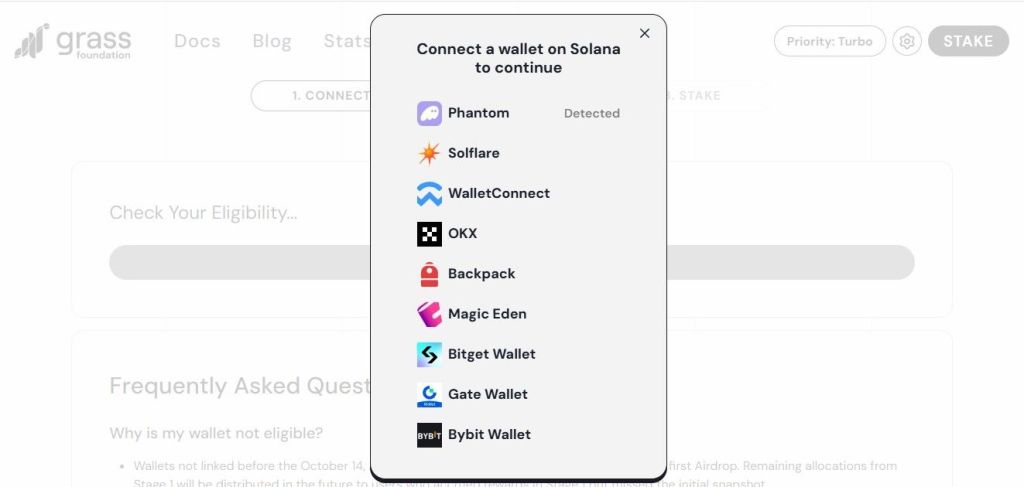
During Stage 1, Grass rewarded eligible users with $GRASS tokens, the platform’s official cryptocurrency built on the Solana blockchain. The rewards were distributed through an airdrop to eligible users who shared their internet connection for more than 14 months. It became one of the biggest crypto airdrops of 2024.
At the beginning of Stage 2, Grass stated that participants would be rewarded with $GRASS tokens after the Stage ended. To support those rewards, Grass allocated 170 million $GRASS tokens for the Stage 2 reward pool.
However, when the rewards were distributed, users received USDC instead, with a total reward pool of just $3 million. In my opinion, the reward allocation was much lower than expected and did not fairly reflect nearly 19 months of user contributions.
Currently, Stage 3 is in progress, and Grass has officially announced that Stage 3 rewards will be paid in USDC using the same reward calculation model introduced in Stage 2. However, the final reward structure is subject to change and will become clear only after the rewards are officially allocated.
Grass allows users to claim their rewards using compatible Solana wallets such as Solflare, Phantom, Bybit, O
As for future rewards beyond Stage 3, Grass has not announced any long-term reward or payment plans. Once the company releases official details, I’ll update this review with the latest information.
Does Grass.io Really Pay?
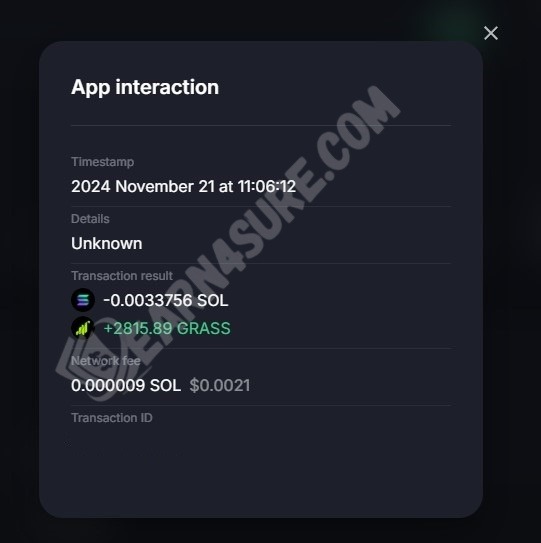
Yes. There’s no doubt that Grass.io is a legitimate platform and it has rewarded users as promised in the past. During Stage 1, eligible users received $GRASS tokens through an airdrop, and Stage 2 rewards have also been allocated and are available to claim.
However, in my opinion, the biggest issue isn’t whether Grass pays—it’s whether the rewards are worth the time and resources you invest. While Stage 1 rewarded many early users generously, I believe the Stage 2 reward allocation fell far short of expectations for most participants.
Below, you can see a screenshot of my Stage 1 reward, which was successfully claimed and deposited into my Solflare wallet.
What You Should Avoid Doing on Grass
To stay eligible for airdrops and avoid getting banned, here are some important things you should not do while using Grass:
1. Don’t Use VPN or Proxy
Never run VPNs or proxies on the same device where Grass is running. If you’re using one, make sure to turn off Grass’s auto-start feature, disable the VPN or proxy first, and then open the app. Using a VPN or proxy can lead to 0% network quality with messages like “Poor Network Quality.” If done intentionally, you could get banned or disqualified from current and future airdrops.
2. Don’t Use Bots
Trying to cheat the system by using bots to gain more points is strictly against the rules. The Grass team actively monitors for this — if you get caught, you’ll be permanently disqualified from all airdrops.
3. Don’t Create Multiple Accounts
Creating fake or multiple accounts to abuse the referral program is not allowed. If the system detects this, all your accounts could be blocked.
4. Don’t Fall for Fake Hacks or Scripts
Avoid trying any so-called “tricks” or coding methods claiming to boost your Grass Points. These are easily detectable, and using them can get you permanently banned from the airdrop program.
Grass is one of the most promising projects in the space, and its popularity is growing fast. If the project succeeds, the token value could multiply by 10x, 100x, or even more in the future. So play fair, stay patient, and hold onto your tokens — your honesty could pay off big time.
Can You Get Support?
Yes — if you have questions or run into problems, Grass offers support in a few ways:
- You can reach out through their official X (formerly Twitter) page or Discord community.
- There’s also an AI chatbot on their website — just click the support icon at the bottom right corner.
- Their FAQ section is helpful too, with answers to most common questions.
However, the support team rarely responds or takes a long time to fix issues — especially when the app or extension isn’t working. So, while support exists, it’s not always quick or reliable.
How to Get Started?

Getting started on Grass is quick and easy. Just follow these steps:
#1. Join the Platform
You can sign up using your email or Google account — it takes less than 2 minutes.
#2. Download the App
After signing up, go to your dashboard and open the Store page. Download the Grass app for your device’s operating system (Android, Windows, Mac, or Linux) and install it.
#3. Log In and Connect
Once installed, open the app and log in using your Grass account. The app will automatically connect to the network.
#4. Activate Network Quality

At first, your network quality will show as 0%. No worries — if you’re running the desktop app, wait 10 to 15 minutes, then click the refresh icon in the top-left corner of the app, or right-click anywhere inside the app and select Refresh. Your network quality will update (this varies depending on your country), and you’ll start earning passively in the background.
If you’re using the mobile app, you don’t need to do anything. You’ll only be able to check your network quality by logging in to your Grass account using a mobile or computer browser.
⚠️ Important: Avoid using the browser extension — Grass plans to end support for it soon, and it may stop working at any time.
How to Fix the 0% Network Quality Issue
Sometimes, even after refreshing the Grass app, your network quality still shows 0% with a message like “Poor Network Quality.” Don’t worry — this is a common issue and can be fixed with a few simple steps:
Step 1: Turn Off VPN or Proxy
If you’re using a VPN or proxy, turn it off. Then restart your PC and open the Grass app again. Wait for 10–15 minutes, then click the refresh option. In most cases, your network quality will now appear.
Step 2: Restart Your PC and Router (for Dynamic IP connections)
Not using a VPN or proxy but still seeing 0%? Turn off both your PC and router. Wait 15–30 minutes. Then restart both devices. Once the Grass app reconnects, wait another 10–15 minutes and click the refresh option. Your network quality should now update.
Step 3: Contact Your ISP (for Static IP connections)
If you’re using a static IP, the above methods won’t work. In this case, contact your ISP and request an IP change. After updating your IP, restart the app and follow the same steps — your network quality should be restored.
How to Fix the Connectivity Issue on Grass
Having trouble connecting to the Grass network? Don’t worry — it’s a common issue. Follow these steps to get back online:
Step 1: Check for the Latest App Version
Make sure you’re running the latest version of the Grass app. If not, download and install the latest version from your dashboard. You can also enable auto-updates to avoid future issues.
Step 2: Wait for 30 to 60 Minutes
Let the app run without any interaction. Sometimes it connects automatically within 30 to 60 minutes. Be patient and let it work in the background.
Step 3: Click the “Start” Icon or “Connect Grass” Button
Click the Start icon or Connect Grass button — but don’t overdo it. Wait 5 to 10 minutes between each click. Repeated clicking won’t help. After a few tries, the app may connect successfully.
Step 3: Refresh the App
Right-click anywhere inside the app and click Refresh. Sometimes it connects right away — try a few times if needed.
Step 4: Restart Your PC and Router
Turn off both your PC and router. Wait 15–30 minutes, then restart both. Open the app again and check if it connects.
Step 5: Uninstall and Reinstall the App
If the above steps didn’t work, completely uninstall the Grass app. Then, turn off both your PC and router and wait 15–30 minutes. Restart both devices, download a fresh copy from your dashboard, and install it. This method often helps the app reconnect.
Step 6: Wait for a Fix from Grass
If nothing works, the issue might be on Grass’s end. In that case, wait for the team to release an update or fix the problem from their side.
Pros:
- Available Worldwide – Anyone around the world can join and use Grass.
- Passive Earnings – Earn money just by sharing your internet bandwidth. No active work needed.
- Easy to Use – Grass is simple to set up and runs automatically in the background once installed.
- App Availability – Supports multiple platforms, including Android, Windows, Mac, and Linux.
Cons:
- Earnings May Vary – Your earnings mainly depend on your actual bandwidth contribution and your referrals’ actual bandwidth contribution to the Grass network.
- Location Matters – Grass’s current reward structure mainly benefits users in the United States, the United Kingdom, and Canada. Users in other regions shouldn’t expect much.
- Connectivity Issues – Some users face frequent connection problems or get a 0% network quality message.
- Limited Support – The support team is often slow or not very responsive.
Final Thoughts
Grass.io (previously known as GetGrass.io) is a legitimate platform that lets you earn passive crypto rewards by sharing your internet connection. However, being legitimate doesn’t automatically mean it’s worth using for everyone.
During Stage 1, Grass rewarded many early users generously by distributing $GRASS tokens through one of the biggest crypto airdrops of 2024. At the beginning of Stage 2, Grass stated that participants would be rewarded with $GRASS tokens after the Stage ended. However, when the rewards were distributed, users received USDC instead, with a total reward pool of $3 million.
Based on the Stage 2 reward allocation, the current reward structure mainly benefits users in the United States, the United Kingdom, and Canada, especially those running Grass on multiple devices or those with a large number of active referrals from these regions. Many users in other countries received rewards ranging from only a few cents to a few dollars, despite contributing their internet connection for more than 19 months.
For that reason, I believe Grass is now worth considering mainly if you live in the United States, the United Kingdom, or Canada, or if you have a strong referral network in those regions. If you live elsewhere, think carefully about whether the potential rewards are worth the long waiting period, your internet costs, and your electricity costs.
Currently, Stage 3 is in progress, and Grass has officially announced that it will follow the same reward model used in Stage 2. However, the final reward structure is subject to change and will become clear only after the rewards are officially allocated.
After Stage 3 ends, Grass may continue with its current Stage-based reward system, introduce a different reward model, or switch to a pay-per-GB bandwidth model. However, no official announcement has been made about its long-term reward plans.
Until then, users outside the high-demand regions may be better off choosing alternatives that offer faster payouts, lower withdrawal thresholds, and the ability to cash out anytime after reaching the minimum withdrawal threshold.
I hope this Grass.io review helps you understand the platform better. If you’re already using Grass or have any questions about it, feel free to leave a comment below. I’ll do my best to reply.
Thank you!